
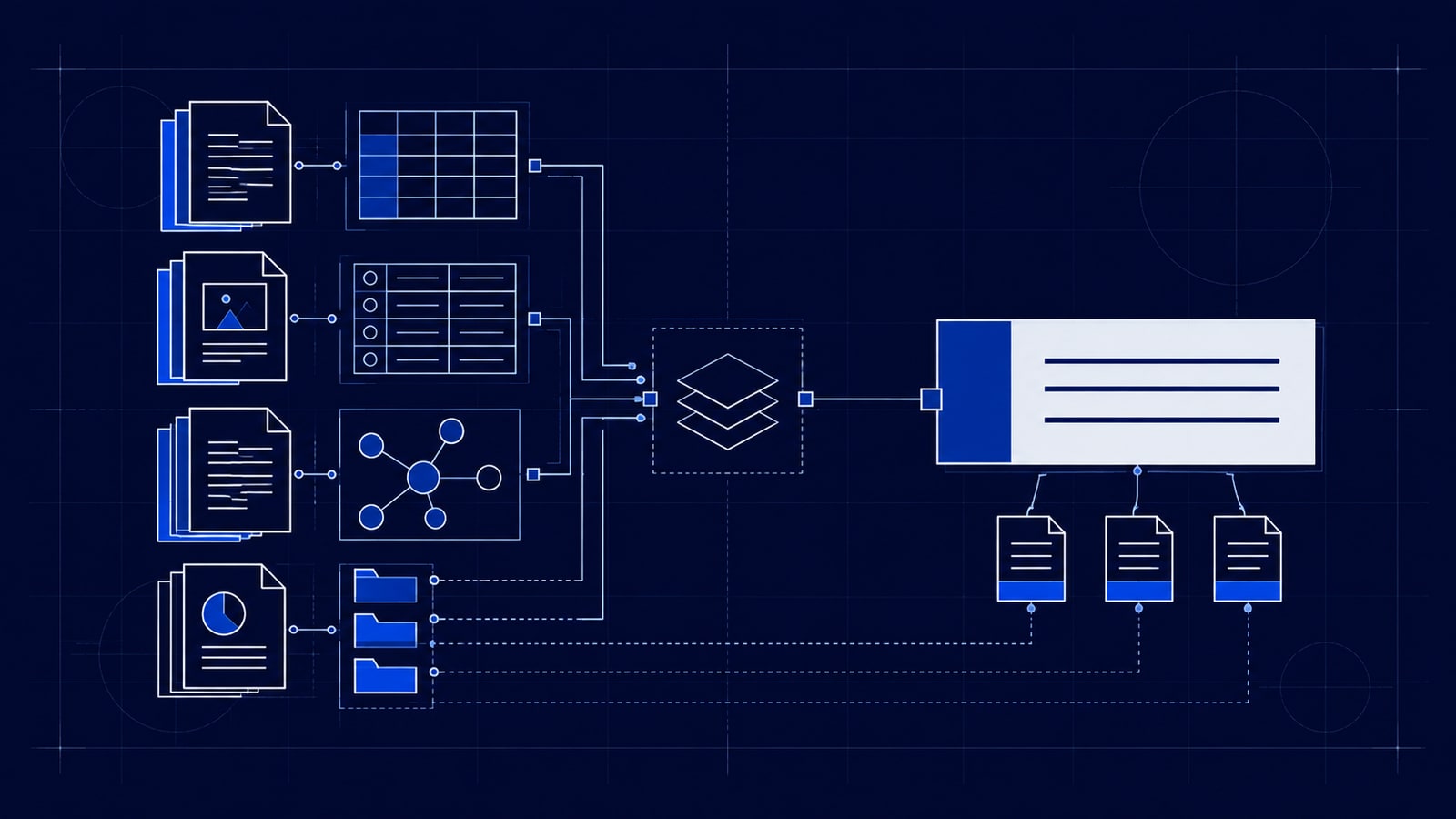
A new employee asks how to onboard a client. Someone sends a document. The document links to an old checklist, and the latest instructions turn out to be in a chat conversation.
The information exists, but finding a reliable answer still takes work.
A knowledge base gives useful information a structure people can navigate, search, and maintain. It might be a collection of written guides, a database of records, or a system that lets an AI assistant retrieve relevant material before answering a question.
A knowledge page is one item within that collection: an onboarding guide, a troubleshooting article, or an explanation of a company policy. The knowledge base connects those items and provides a way to find them.
Understanding the options starts with two separate questions: what will the knowledge base help people do, and how will the information be stored and retrieved?
What a knowledge base can help people do
Different purposes lead to different knowledge bases. An internal company wiki holds policies, team information, and shared guidance. Operational playbooks describe how to carry out work through standard operating procedures, checklists, and decision rules. A customer help centre contains answers and troubleshooting steps customers can use themselves.
Technical documentation explains software, APIs, and systems. A project or client knowledge base preserves requirements, decisions, meeting notes, and deliverables. A personal knowledge base brings together someone's research, ideas, and references. Sales teams may also maintain approved product information and answers to common buyer questions.
These uses can overlap. An onboarding process might draw on company policies, a client record, and a technical setup guide. Sales and support teams might use the same approved product information to answer different questions, reducing the need to maintain separate versions of the same facts.
Adding AI changes how people access the information. It can let someone ask a question in ordinary language and receive an answer drawn from the underlying material. An AI knowledge base can therefore serve any of the purposes above.
Storage, search and decision logic
The technical choices sit underneath that experience. Files, databases, and search indexes have different jobs, and a single system can use several of them.
| Approach | What it does | Example |
|---|---|---|
| File-based knowledge | Keeps information in readable documents such as Markdown, PDFs, or HTML | A folder of guides, managed with an editor such as Obsidian |
| Relational database | Organises records into tables with defined fields and relationships | SQLite, or PostgreSQL through Supabase |
| Document database | Stores flexible records that can contain different fields and nested information | MongoDB |
| Full-text search index | Indexes words and ranks matching material for retrieval | Elasticsearch |
| Vector database or index | Stores numerical representations of content so it can be searched by similarity | Qdrant, or PostgreSQL with the pgvector extension |
| Graph database | Represents entities and their connections explicitly | Neo4j |
| Rule-based system | Applies explicit logic to stored facts to derive an answer or decision | A rules engine that checks eligibility against defined conditions |
These categories describe different aspects of a system. Some are storage models, some are retrieval methods, and rules add decision logic. Products can cover more than one category.
Starting with Markdown files
Markdown is a useful place to start understanding the difference. It is a plain-text format for writing documents with headings, lists, and links. A file such as client-onboarding.md might contain the steps your team follows whenever a new client signs up. Obsidian stores its notes as local Markdown files that other text editors can also read and edit. Obsidian documentation
A well-organised folder of these files can be a useful knowledge base. People can read the guides, and an agent with suitable file access can retrieve them. However, the files themselves do not provide a search service, database queries, or a permissions system. Those capabilities come from the surrounding tools.
When structured records matter
Structured databases become useful when you need to work with consistent facts. A document might explain your support process, while a database records each customer's plan, account owner, and renewal date. A query can then find customers whose renewals fall within a particular period.
SQLite provides a SQL database in a single file without a separate database server. That makes it worth considering for local applications and tools that need structured records. SQLite overview
Supabase provides a PostgreSQL database alongside services such as authentication and file storage. It is an option for shared applications and automations that need to manage records and control access. It also supports pgvector, an extension for storing and searching vectors within PostgreSQL. Supabase database documentation
That means a Supabase-based knowledge system could store document details, extracted passages, and the vectors used to search those passages. Adding a separate vector database would be a design choice, rather than an automatic requirement.
Files and databases can also work together. A team could edit its guides in Markdown while a database holds searchable copies of the content. Each search result would retain a reference to the original guide, and an update process would keep the searchable copy aligned with it.
What a document database actually stores
The term "document database" can cause confusion here. In MongoDB, a document is a structured, JSON-like record. It could describe a product with nested specifications and optional fields. It does not simply mean a folder containing Word documents or PDFs. MongoDB documentation
Keyword, semantic and hybrid search
Retrieval is another decision. If someone searches for a product name or a particular error message, keyword search is useful because the wording matters. Full-text search indexes the content and ranks matches; BM25 is one common ranking method used in this area. Elasticsearch documentation
If someone asks, "How do I bring a new customer into the business?", the relevant guide might be called "Client onboarding". Semantic search aims to find related meaning even when the wording differs. It commonly uses embeddings: numerical representations generated by a model so that pieces of content can be compared.
Hybrid search combines keyword and semantic retrieval. It can help when people alternate between precise terms and loosely phrased questions. The combination still needs testing against the questions your users actually ask. Supabase hybrid-search guide
When relationships are the main question
Graph databases address a different kind of question. Imagine tracking which clients use which services, which services depend on particular systems, and who owns those systems. A graph makes those connections explicit, allowing queries to follow them. Relational databases also support relationships; graphs become worth evaluating when following complex connections is central to the work.
How retrieval-augmented generation works
Once the system can retrieve useful information, an AI model can use that material to write an answer. This approach is called retrieval-augmented generation, usually shortened to RAG. A typical flow is:
- Prepare the source material for search, often by extracting text and splitting long documents into passages.
- Receive the user's question.
- Retrieve relevant material the user is authorised to access.
- Give that material and the question to the model.
- Return an answer with references to the supporting sources.
RAG describes this retrieval-and-answering process. It can use different databases and search methods. In this setup, the model receives relevant information at question time; the process does not itself retrain the model. AWS explanation of knowledge-base retrieval
For example, a support assistant could retrieve an approved cancellation policy and explain the steps to a customer. To answer a question about that customer's current subscription, it would also need access to the appropriate account record. General guidance and live customer facts have different sources.
Keeping answers reliable
Reliability depends on how those sources are managed. If two documents contain conflicting policies, search may retrieve either one. If an old document remains in the index after its replacement is published, the assistant may continue using it. A source link helps someone inspect an answer, but does not prove the model interpreted the source correctly.
For a business knowledge base, I would keep an owner, review date, approval status, and source reference for important content. I would also define how edits and deletions reach the search index, and enforce access restrictions before restricted content reaches the model.
Testing should include ordinary questions, vague questions, conflicting information, and questions the material cannot answer. A useful system needs a clear way to acknowledge missing evidence or pass a question to someone who can resolve it.
Choose tools around real questions
The starting tool should follow the work. For a curated set of guides, I would consider Markdown files and straightforward search. For a local application with structured records, SQLite is a candidate. For a shared application combining records, permissions, and AI retrieval, Supabase is worth evaluating. Dedicated search, vector, or graph tools become relevant when the actual retrieval requirements justify them.
Before choosing, collect a small set of real questions from the intended users. Identify the approved source for each answer and note who may access it. Build enough to answer those questions, then check whether the system finds the right material, explains it accurately, and reflects changes when a source is updated.